
WordPress Editorial Workflow Automation: From Draft to Publish Without the Bottleneck
Set up automated content review, approval notifications, and status transitions in WordPress. Native hooks, plugin options, and no SaaS middleware required.
WordPress Editorial Workflow Automation: From Draft to Publish Without the Bottleneck
Every content team hits the same wall. Posts sit in limbo waiting for review, editors chase authors through email, and nobody knows which draft is ready to publish. WordPress editorial workflow automation solves this by turning manual handoffs into structured, trackable status transitions — all running on your own server.
This tutorial walks you through three approaches to automating your editorial pipeline: native WordPress capabilities, plugin-based workflows, and custom code. By the end, you will know which layer fits your team and how to set it up.
Why Editorial Workflows Break Down
Before reaching for any tool, identify where your process stalls. Most content teams hit the same bottlenecks:
- Communication gaps. Review requests get buried in email and chat. Automation fix: trigger notifications the moment a post status changes.
- Unclear ownership. No one knows who handles the next step. Automation fix: assign roles to specific workflow stages.
- Single-person approval gates. One editor becomes the bottleneck for every post. Automation fix: route approvals to available reviewers based on content type.
- No rejection path. Posts needing revision restart from scratch instead of looping back to the author. Automation fix: create a “needs revision” status that routes posts back with context.
Each bottleneck maps to a specific automation pattern. The key is matching the right solution layer to your team’s resources.
How WordPress Editorial Workflow Automation Works
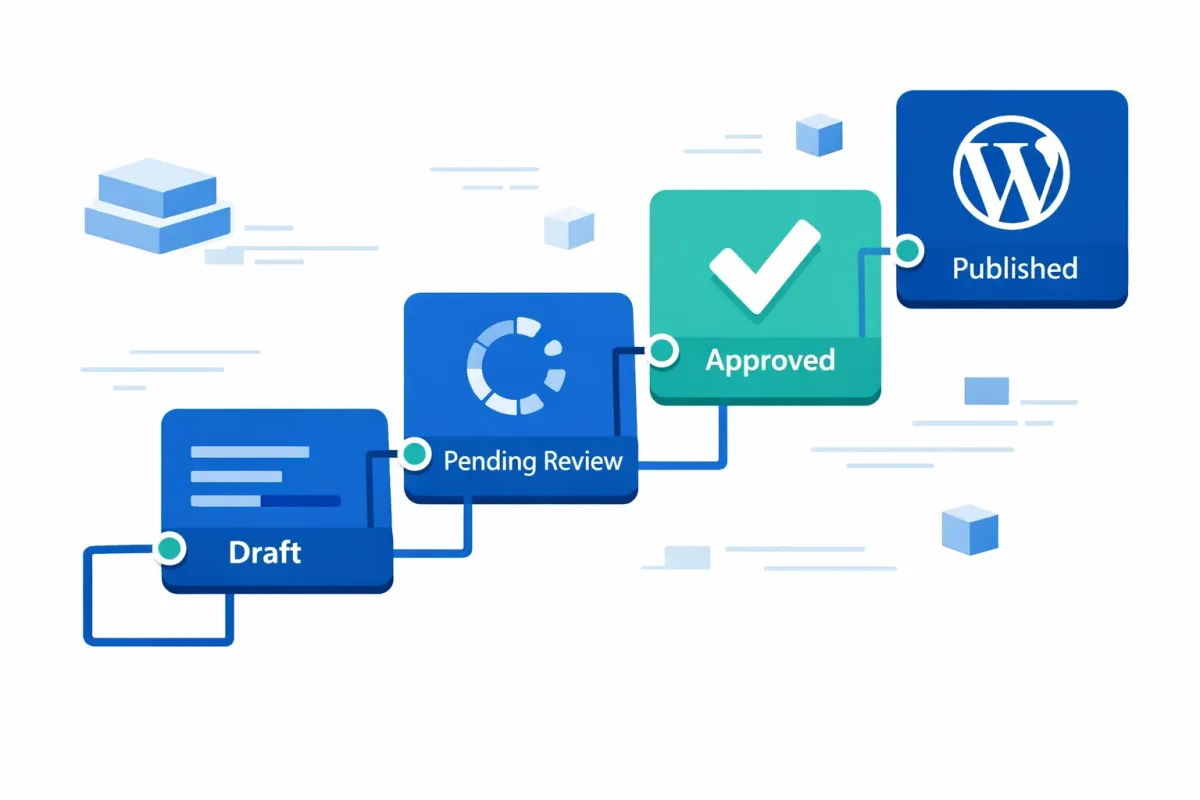
WordPress handles editorial automation through post status transitions. Every post moves through a pipeline:
Draft > Pending Review > Approved > Published
Each status change is a potential automation trigger. When a post moves from draft to pending, WordPress fires the transition_post_status hook. You can attach actions to that hook — sending an email, posting to a Slack channel via WordPress webhook notifications, or updating a project tracker.
WordPress ships with eight built-in post statuses (draft, pending, future, publish, private, trash, auto-draft, inherit). The native Contributor-to-Editor handoff — where Contributors see “Submit for Review” and the post enters pending status — is the only built-in content approval workflow. Everything beyond that requires plugins or custom code.
All of this runs on your server. No per-task pricing, no external middleware, and no data leaving your infrastructure. For a deeper look at cost implications, see our self-hosted automation cost comparison.
Choosing Your Automation Layer
WordPress editorial workflow automation comes in three layers. The right approach depends on your team size, technical resources, and workflow complexity:
Layer 1: Native WordPress — Best for small teams (1-3 authors) with a single editor. Use the built-in Contributor/Editor role hierarchy and pending status as your review gate. Cost: free. Limitation: no custom stages, no automated notifications.
Layer 2: Plugin-based — Best for content teams and agencies running 10+ posts per month. Plugins add custom statuses, notifications, editorial calendars, and visual workflow builders. Cost: free to $150/year. See our build vs. buy decision framework for guidance on evaluating plugin investments.
Layer 3: Custom code — Best for developer-resourced teams with unique requirements. Register custom post statuses with register_post_status(), hook into transition_post_status, and build notification logic with wp_mail(). Cost: development time. Benefit: no plugin dependency, total control.
Most teams start at Layer 1 and move to Layer 2 as volume grows. Layer 3 makes sense when you need behavior no plugin supports or when integrating editorial automation with form submission triggers or other custom systems.
Setting Up Automated Review and Approval
Custom Post Statuses as Workflow Stages
The native pending status covers basic review, but multi-stage workflows need additional statuses. PublishPress Statuses (free, updated February 2026) lets you create unlimited custom statuses — for example, In Review, Legal Approval, or Needs Revision — without writing code. Each status becomes a stage in your pipeline.
Oasis Workflow (4.8/5, 103K+ downloads, updated January 2026) takes a different approach with a visual drag-and-drop workflow designer. You define stages, assign roles, and set transition rules graphically. It also provides an audit trail of every status change.
Automated Notifications
Both plugins support email notifications on status change. When a post moves to In Review, the assigned editor gets an alert. When an editor moves a post to Needs Revision, the author receives feedback.
For teams already using PublishPress Planner (4.9/5, 429K+ downloads, updated December 2025), the editorial calendar integrates with custom statuses for a visual overview of where every post sits in the pipeline.
Rejection Loops
A rejection loop routes posts back to the author when revisions are needed. Define a Needs Revision custom status that notifies the original author with the editor’s comments. The author revises and resubmits, and the cycle repeats until approval. This prevents posts from disappearing after rejection.
A note on Edit Flow: Version 0.10.3 has documented fatal PHP errors that can crash sites on activation. Evaluate alternatives before installing.
Automating Notifications with Code
If you prefer code over plugins, the transition_post_status hook gives you direct control. Here is a working example that emails the site administrator when any post moves to pending:
add_action( 'transition_post_status', 'notify_editor_on_review', 10, 3 );

function notify_editor_on_review( $new_status, $old_status, $post ) {
    // Only fire on actual status changes to 'pending'
    if ( $new_status === 'pending' && $old_status !== 'pending' ) {
        $editor_email = get_option( 'admin_email' );
        $subject      = 'Post ready for review: ' . $post->post_title;
        $message      = sprintf(
            "A new post needs your review:\n\n%s\n\nEdit: %s",
            $post->post_title,
            get_edit_post_link( $post->ID, '' )
        );
        wp_mail( $editor_email, $subject, $message );
    }
}
The $old_status !== 'pending' check is essential — without it, the hook fires on every post update, even when the status has not changed.
When to use code vs. plugin: Choose code for a single, specific automation with zero plugin overhead. Choose a plugin when you need multiple stages, visual workflow management, or role-based routing. For more complex patterns including Slack integration, see our guide to Gravity Flow approval workflows.
What WordPress 7.0 Changes (and What It Does Not)
WordPress 7.0 (final release April 9, 2026; Beta 1 released February 20, 2026) introduces real-time co-editing, inline Notes with @mentions, and Suggestions Mode. These are collaboration features — they help teams write and review content together.
What 7.0 does not add: custom post statuses, automated approval chains, or status transition notifications. WordPress editorial workflow automation remains plugin or custom code territory. If your team needs both, plan to combine 7.0’s collaboration features with the automation layers described above.
Frequently Asked Questions
What is an editorial workflow in WordPress?
An editorial workflow is the process content follows from draft to publication. In WordPress, this maps to post status transitions: a post moves from draft to pending (review), through any custom approval stages, and finally to publish. The workflow defines who is responsible at each stage and what happens when content moves between stages.
Can I automate content approval without third-party middleware?
Yes. WordPress provides the transition_post_status hook for code-based automation, and self-hosted plugins like PublishPress Statuses and Oasis Workflow run entirely on your server. No external platforms or per-task fees required. For cost and ROI justification, see our automation ROI framework.
How do I notify editors when a post is ready for review?
Use the transition_post_status hook with wp_mail() to send an email when a post enters pending status (see the code example above). For webhook-based notifications, see our WordPress webhook notifications tutorial.
Want more editorial workflow strategies? Subscribe to our newsletter for practical WordPress automation tutorials delivered to your inbox.